Creating a Crew (Control Campaign)
Quick Reference
- Choose a Faction — one of the four Commonwealth Factions: Brotherhood of Steel, Institute, Minutemen, or Railroad. Name your crew. All new crews start at Tier 1.
- Recruit Models — total Rating Limit: 250. Pick each model's Weapon Set (this sets its Rating). Exactly 1 Leader; Champions ≤ your Faction's Champion Limit (Tier 1 = 3); Grunts ≤ 5 per Champion.
- Finishing Touches — total model Ratings = Reputation. Leftover Rating converts 1:1 to Caps in your Stash. Copy Champion Limit, Upgrade Limit, and Total Control Limit from the Faction List into the Crew Limits box on your Story Sheet.
- After your first game — you will be prompted to choose a Quest Line and begin filling in your Crew Territory.
When you play Fallout: Factions, you control the same crew from game to game, charting its journey and watching its story develop. First, though, you need to put it together! [Battle for Boston pg. 34]
You need both pages of the Crew Roster (pgs. 102–103, or downloaded from the Modiphius website). Your Crew Roster is a living document and will be updated both during and after a game, so use a pencil rather than a pen when filling it out. Once you have your Crew Roster ready, follow the steps here to create your crew. [Battle for Boston pg. 34]
Turn to the Model Class section of your chosen Faction List to see the options available to you. When choosing a model, you must pick one of its available Weapon Sets, which determines the model's Rating. [Battle for Boston pg. 34]
When you start a crew, you have a total Rating Limit of 250. Use this Rating Limit to purchase models from the Faction Lists. A model's Rating is determined by the Weapon Set you choose to equip it with. When you have finished creating your crew, turn any leftover Rating into Caps. [Battle for Boston pg. 34]
Note
This Rating Limit only applies while creating your crew. Experienced crews will attain much higher Ratings! [Battle for Boston pg. 34]
Step 1 — Choose a Faction
The Appendix contains four Faction Lists (pg. 60): the Brotherhood of Steel, the Institute, the Minutemen, and the Railroad. The first step in creating a crew is to choose one of these. [Battle for Boston pg. 34]
You may want to choose the one that best suits your playstyle, the one whose aesthetic appeals the most, or your favorite from the video game. The choice is yours! [Battle for Boston pg. 34]
Once you've chosen a Faction, think of a suitably impressive name for your crew. You can fill in some basic information on your Crew Roster (player name, crew name, and crew Faction) at the top of your Game Sheet and Story Sheet. [Battle for Boston pg. 34]
All new crews start at Tier 1, so write "1" under "Tier" on your Game Sheet. [Battle for Boston pg. 34]
Other Factions
The four Factions found in this book are the Factions available when playing a campaign centered on the Commonwealth. This campaign is designed specifically for these Factions. Other Factions are available through the Modiphius website and supplements, but you will need the appropriate product to play with them in a campaign. [Battle for Boston pg. 34]
Step 2 — Recruit Models
Now you can choose models to add to your crew. Any models you choose at this stage are a permanent part of your crew, at least until they come to a sticky end during a game. If you want a balanced starting crew, each Faction comes with a quick start crew at the end of its Faction List. [Battle for Boston pg. 34]
Model Classes and Weapon Sets
Turn to the Model Class section of your chosen Faction List. Each model belongs to one of three classes — Leader, Champion, or Grunt — and lists one or more Weapon Sets. The Weapon Set you choose determines the model's Rating, so it is worth planning your crew on scrap paper before committing anything to the Crew Roster. [Battle for Boston pg. 34]
Weapons, weapon traits, critical effects, and perks are shared across all Factions. Look them up in the compendium rather than re-copying their rules:
Other Limitations
Before choosing models, read the Crew Creation section of your Faction List. This section notes any special limitations or requirements when creating a new crew. Unless otherwise specified, all crews must abide by the following limitations. [Battle for Boston pg. 34]
One Leader
The first Model Class in each Faction List is a Leader. A crew must include exactly one model of this Class — no more, no less. [Battle for Boston pg. 34]
Champion Limit
You cannot have more Champions than the Champion Limit given in the Crew Limits section of your Faction List. As your crew will be Tier 1, use the value in the Tier 1 column. [Battle for Boston pg. 34]
For example, a starting Brotherhood of Steel crew cannot have more than three Champions. [Battle for Boston pg. 34]
Grunt Limit
You cannot have more than five Grunts for each Champion in your crew. [Battle for Boston pg. 34]
For example, if you have two Champions in your crew, you can have up to ten Grunts. [Battle for Boston pg. 34]
Note
This limit only applies when you recruit your crew, and during Recruit Story Actions. If, for any reason during the course of play, you end up with more than five Grunts for each Champion, do not remove any Grunts or otherwise alter the composition of your crew. [Battle for Boston pg. 34]
Absent Models
Models may become Injured during a campaign. To show this, fill in the Absent box on your Story Sheet. These models still count toward the Crew Limits. Once they are removed from the Game Sheet (usually by being killed), they no longer count toward Crew Limits. [Battle for Boston pg. 35]
Model Entries
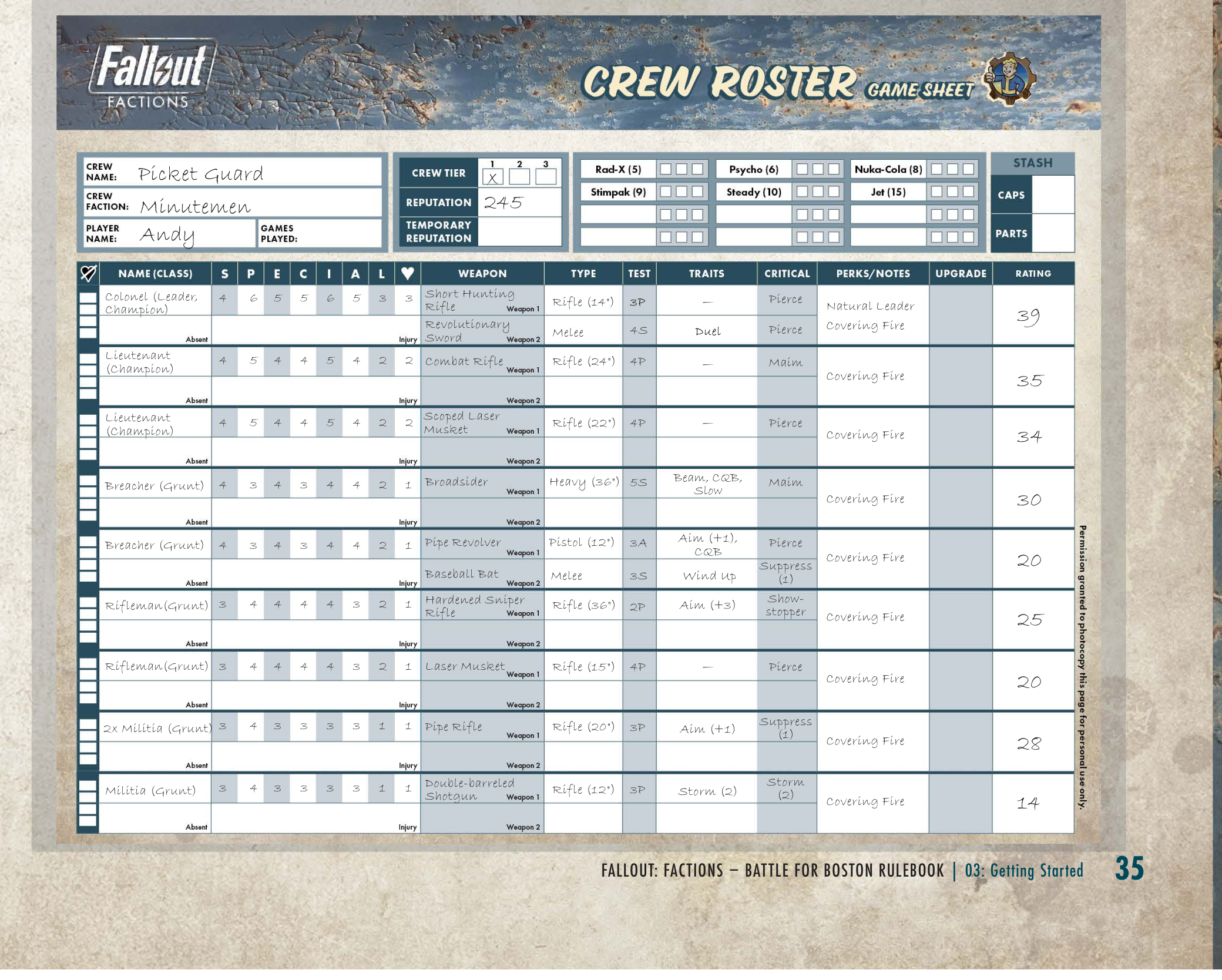
When you add a model to your starting crew, copy its Profile, as well as the Profile(s) of the weapon(s) it is carrying, into an empty row on the Game Sheet of your Crew Roster. [Battle for Boston pg. 35]
If the model is carrying two weapons, copy both of them across. Use the upper half of a row for one weapon and the lower half for the second. [Battle for Boston pg. 35]
You may find it useful to figure out your crew composition on a piece of scrap paper before you start copying information across to your Crew Roster. [Battle for Boston pg. 35]
Step 3 — Finishing Touches
The total Rating value of all the models in your crew is its Reputation. Write this in the Reputation box at the top of your Game Sheet. Whenever you play a game, this is used to measure your crew up against your opponent's. [Battle for Boston pg. 35]
If your crew's Reputation is less than its Rating Limit (250), the difference is converted to Caps. Write this in the Caps section of your Stash (at the top of your Story Sheet). You can spend these Caps later, either to purchase Chems or add new models to your crew. [Battle for Boston pg. 35]
Example
Adding up the Rating of all the models in your crew gives a total Rating value of 238. You write 238 in the Reputation box. You then write 12 (the difference between 250, your crew's Rating Limit, and 238, your crew's Reputation) in the Caps section of your Stash. [Battle for Boston pg. 35]
Copy Your Crew Limits
Copy across the Champion Limit, Upgrade Limit, and Total Control Limit from the Crew Limits section of your Faction List. These go in the Crew Limits box in the top-right corner of the Story Sheet. All four Commonwealth Factions share the same Crew Limits: [Battle for Boston pg. 60]
| Tier 1 | Tier 2 | Tier 3 | |
|---|---|---|---|
| Upgrade Limit per Model | 4 | 6 | 8 |
| Champion Limit | 3 | 4 | 5 |
| Total Control Limit | 5 | 10 | 15 |
[Battle for Boston pg. 60]
Your Total Control Limit is the maximum amount of Control your crew can hold across all Boston Locations at once. It does not come into play during crew creation — you gain Control by playing games — but recording it now means it is ready when you start winning territory. As your crew advances through the Tiers, you will raise these limits to match the new Tier's column. [Battle for Boston pg. 60]
After Your First Game — Quest Line and Crew Territory
You do not choose a Quest Line or fill in your Crew Territory during crew creation. Instead, the first time your crew reaches the Story Phase, you will be prompted to complete these parts of the Story Sheet. [Battle for Boston pg. 41]
- Quest Line — after your first game, choose a Quest Line from your Faction List and fill in the Tier One Goals section. This tracks the long-term Goals that drive your crew's progression. [Battle for Boston pg. 41]
- Crew Territory — a panel tracking how well-established the crew is in each of the five Boston Locations (C.I.T. Ruins, Combat Zone, Diamond City, Goodneighbor, and Trinity Tower). It records your Control and Scout values per Location, plus your Control Total and Home Turf, and is used when choosing Scenarios. [Battle for Boston pg. 41]
These pieces of the Story Sheet start empty on a brand-new crew; they fill in as your campaign unfolds.
Example Crew
Example Crew: The Picket Guard
Here you can see a completed Crew Roster Game Sheet for the Picket Guard, a brand-new Minutemen crew (player: Andy) that's eager to help the people of the Commonwealth and make a name for itself. The header records the Crew Name (Picket Guard), Crew Faction (Minutemen), Tier (1), and Reputation (245). Each model occupies a numbered row listing its class, S.P.E.C.I.A.L. profile, weapon(s), and Rating; two-weapon models split their row into upper and lower halves. [Battle for Boston pg. 35]