Creating a Crew
Quick Reference
- Choose a Faction — 4 factions from the Rulebook; 7 more from the Folio. Each Rulebook faction also has subfactions (Folio). All new crews start at Tier 1.
- Find Your Home Turf — Roll two dice for a Hazard, then two dice for a Facility. Matching dice = gain 2 Reach. A roll of 10 on the Hazard table = Nomadic (no Hazard, no Facility; Rating Limit 300).
- Recruit Models — Rating Limit: 250 (300 if Nomadic). Exactly 1 Leader. Champions ≤ Faction Champion Limit (Tier 1 column). Grunts ≤ 5 × number of Champions.
- Finishing Touches — Total model Ratings = Reputation. Leftover Rating points convert 1:1 to Caps. Copy Upgrade Limit, Champion Limit, and Facility Limit from your Faction List.
- Share Crew — Post name, Faction, Hazards, Facilities, and current Tier for all players to see.
Fallout: Factions is a campaign-based multiplayer game. Each game takes place between two players, but the campaign as a whole can stretch to include a small friendship group or an entire friendly local gaming store with dozens of players organizing their sessions via social media. If you don't have a campaign to join, it's time to make one! [Rulebook pg. 29]
Creating Your Crew
When you play Fallout: Factions, you control the same Crew from game to game, charting its journey and watching its story develop. First, though, you need to put it together! [Rulebook pg. 29]
You need both pages of the Crew Roster, which can be found on pgs. 110–111 or downloaded from the Modiphius website. Your Crew Roster is a living document and will be updated both during and after a game, so you should use a pencil rather than a pen when filling it out. [Rulebook pg. 29]
Once you have your Crew Roster ready, follow the steps here to create your crew. [Rulebook pg. 29]
Step 1 — Choose a Faction
The Rulebook contains four Faction Lists: the Brotherhood of Steel, the Super Mutants, the Survivors, and the Wasteland Raiders. The first step in creating a crew is to choose one of these, or one of the seven additional Factions introduced in the Folio. [Rulebook pg. 29]
You may want to choose the one that best suits your playstyle, or the one whose aesthetic appeals the most, or your favorite from the video game. The choice is yours! [Rulebook pg. 29]
Once you've chosen a Faction, think of a suitably impressive name for your crew. You can fill in some basic information on your Crew Roster (player name, crew name, and crew Faction) at the top of your Game Sheet and Story Sheet. [Rulebook pg. 29]
All new crews start at Tier 1, so write "1" under "Tier" on your Game Sheet. [Rulebook pg. 29]
Available Factions
From the Rulebook (4 factions, each with subfactions from the Folio):
- Brotherhood of Steel
- Super Mutants
- Survivors
- Wasteland Raiders
From the Folio (7 factions):
- Nuka-World Gangs: The Pack, The Operators, The Disciples
- Gunners
- Followers of the Winged One
- Zetans
- Children of Atom
- Trappers
- Automatrons
Choosing a Subfaction
Subfactions are an optional way to play the crews you may already know, but with a few elements switched around. Rather than being entirely new Faction Lists, a subfaction integrates with a pre-existing Faction List, changing out elements such as Weapon Sets, Ploys, and models while keeping other parts the same. [Folio pg. 17]
You can choose a subfaction for your crew during Step 1 when creating a crew for a campaign, or when building your list ahead of a C.O.M.P. tournament. After selecting a Faction, you can choose a subfaction from those available. If you do so, make a note of the chosen subfaction under "Crew Faction" on your Crew Roster. [Folio pg. 17]
For example, if you wanted to play Survivors but with the Ghouls subfaction, you would note down "Survivors/Ghouls" on your Crew Roster. When constructing and playing your crew, take note of any parts of the Crew List that the subfaction will replace or change. [Folio pg. 17]
When changing a part of a Crew List to accommodate a subfaction, Quest Goals may need to change to accommodate the changed element. In those instances, that Goal will change to require the use of that changed element. [Folio pg. 17]
Once you have chosen a subfaction for a crew, it cannot be changed or removed for the duration of a campaign or tournament. [Folio pg. 17]
Step 2 — Find Your Home Turf
All crews have to start somewhere; all crews call some part of the Wasteland home. A campaign of Fallout: Factions can take place anywhere, from DC to Boston, Appalachia to the Mojave. [Rulebook pg. 30]
To determine your crew's Home Turf, you'll need to determine a Hazard and a Facility. These are the elements that make your Home Turf unique! [Rulebook pg. 30]
Hazard
A Hazard describes the nature of your crew's Home Turf. A Hazard affects both the Terrain and brings unique Special Rules to games when a crew is defending their Home Turf. [Rulebook pg. 30]
To determine your Home Turf's Hazard, roll two dice and check the corresponding results on the Hazard Table, choosing one of the rolled Hazards and resolving its Effect. When the dice are rolled, if they are the same number — gain 2 Reach and add it to your Story Sheet. [Rulebook pg. 30]
For a full list of the in-game effects for each Hazard, see Hazards. [Rulebook pg. 30]
Facility
A Facility describes the nature of a significant, but crumbling building within the crew's Home Turf. Facilities affect the options available to its owner's crew during the Story Phase. [Rulebook pg. 30]
To determine your Home Turf's Facility, roll two dice and check the corresponding results on the Facility Table, choosing one of the rolled Facilities and resolving its Effect. When the dice are rolled, if they are the same number — gain 2 Reach and add it to your Story Sheet. [Rulebook pg. 30]
If a crew becomes Nomadic during the Hazard stage, it does not roll for a Facility. [Rulebook pg. 30]
Hazard Table
| Result | Hazard | Effect |
|---|---|---|
| 1 | Irradiated | Add Irradiated as your Home Turf Hazard on your Story Sheet. |
| 2 | Minefield | Add Minefield as your Home Turf Hazard on your Story Sheet. |
| 3 | Bog | Add Bog as your Home Turf Hazard on your Story Sheet. |
| 4 | Security Turrets | Add Security Turrets as your Home Turf Hazard on your Story Sheet. |
| 5 | Low Visibility | Add Low Visibility as your Home Turf Hazard on your Story Sheet. |
| 6 | Barren | Add Barren as your Home Turf Hazard on your Story Sheet. |
| 7 | City Ruins | Add City Ruins as your Home Turf Hazard on your Story Sheet. |
| 8 | Unstable Fuel | Add Unstable Fuel as your Home Turf Hazard on your Story Sheet. |
| 9 | Harrowed | Add Harrowed as your Home Turf Hazard on your Story Sheet. |
| 10 | Nomadic (No Hazard) | Do not add a Hazard to your Crew Roster; skip directly to Step 3. You do not gain a Facility. Your total Rating Limit is 300 when recruiting models, not 250. |
[Rulebook pg. 30]
Facility Table
| Score | Facility | Effect |
|---|---|---|
| 1 | Unopened Vault | Add Unopened Vault under your Home Turf Facility on your Story Sheet. |
| 2 | Factory | Add Factory under your Home Turf Facility on your Story Sheet. |
| 3 | Trader Outpost | Add Trader Outpost under your Home Turf Facility on your Story Sheet. |
| 4 | Chem Lab | Add Chem Lab under your Home Turf Facility on your Story Sheet. |
| 5 | Infirmary | Add Infirmary under your Home Turf Facility on your Story Sheet. |
| 6 | Food Store | Add Food Store under your Home Turf Facility on your Story Sheet. |
| 7 | Lookout | Add Lookout under your Home Turf Facility on your Story Sheet. |
| 8 | Comfortable Quarters | Add Comfortable Quarters under your Home Turf Facility on your Story Sheet. |
| 9 | Tunnels | Add Tunnels under your Home Turf Facility on your Story Sheet. |
| 10 | Monument | Add Monument under your Home Turf Facility on your Story Sheet. |
[Rulebook pg. 30]
Reach
Reach is an additional resource available to crews during a campaign that represents their influence, and ability to grow as a force in the Wasteland. It is initially gained during crew creation, as well as at various other stages throughout the crew's lifetime. Generally, Reach is spent to advance through Crew Tiers after resolving Quests (pg. 56), as well as various Story Actions during the course of a campaign. [Rulebook pg. 30]
Facility Effects
Most Facilities have a unique effect that allows, or modifies, specific Story Actions. This section details what each Facility does; Story Actions are further detailed on pg. 57. [Rulebook pg. 31]
Unopened Vault
The area contains a pre-war Vault, a useful cache... if you can work out how to open it. A crew with an Unopened Vault Facility may take the Open Vault Story Action (pg. 59). [Rulebook pg. 31]
Factory
Tools and materials are needed for the fine work of upgrading their weapons. A crew with a Factory Facility improves their Modify Weapons Story Actions (pg. 59). [Rulebook pg. 31]
Trader Outpost
A peaceful settlement trades with nearby settlers, but also acts as a target for Raiders. A crew with a Trader Outpost Facility improves their Barter Story Actions (pg. 57). [Rulebook pg. 31]
Chem Lab
A pre-war pharmacy or a modern clinic, this location has access to rare distilling methods. A crew with a Chem Lab Facility may take the Craft Chems Story Action (pg. 57). [Rulebook pg. 31]
Infirmary
Many medical techniques were lost to the bombs, but necessity is the mother of invention. A crew with an Infirmary Facility improves their Recuperate Story Actions (pg. 60). [Rulebook pg. 31]
Food Store
Pre-packaged food is high in additives, and low in rads! A crew with a Food Store Facility improves their Recruit Story Actions (pg. 60). [Rulebook pg. 31]
Lookout
Watchtowers or natural vistas give a unique vantage point over nearby regions. A crew with a Lookout Facility improves their Scout Story Actions (pg. 60). [Rulebook pg. 31]
Comfortable Quarters
Pre-war hotels provide a level of comfort as rare as any tech. A crew with a Comfortable Quarters Facility improves their Crew Training Story Actions (pg. 58). [Rulebook pg. 31]
Tunnels
This region has plenty of underground areas, allowing for covert travel. A crew with the Tunnels Facility can avoid becoming Nomadic. If this crew would become Nomadic for any reason, they may instead move Underground, preventing them from becoming Nomads. While Underground, if subjected to another effect that would cause this crew to become Nomads, they cannot resist the effect. This crew may use the Surface Story Action (pg. 60) to move out of the Tunnels. [Rulebook pg. 31]
If a crew with Tunnels is attacked as an Assault (pg. 46), the attacking crew cannot make this location their Home Turf. [Rulebook pg. 31]
Monument
Be it discarded obelisks of the old world or symbols of post-war progress, this area fills the people living here with pride. A crew with a Monument Facility gains 1 Reach at the end of each Story Phase. [Rulebook pg. 31]
Step 3 — Recruit Models
Now you can choose models to add to your crew. Any models you choose at this stage are a permanent part of your crew, at least until they come to a sticky end during a game. If you want a balanced starting crew, each Faction comes with a quick start crew at the end of its Faction List. [Rulebook pg. 32]
Turn to the Model Class section of your chosen Faction List to see the options available to you. (If you need a reminder of the information found in a Model Class entry, turn to pg. 14.) When choosing a model, you must pick one of its available Weapon Sets which determines the model's Rating. [Rulebook pg. 32]
When you start a crew, you have a total Rating Limit of 250 (or 300, if you're Nomadic). Use this Rating Limit to purchase models from the Faction Lists. A model's Rating is determined by the Weapon Set you choose to equip it with. When you have finished creating your crew, turn any leftover Rating into Caps. [Rulebook pg. 32]
Note that this Rating Limit only applies while creating your crew. Experienced crews will attain much higher Ratings! [Rulebook pg. 32]
Other Limitations
Before choosing models, read the Crew Creation section of your faction crew list. This section notes any special limitations or requirements when creating a new crew. Weapon Sets and certain models may also have their own limitations, which should also be checked. Unless otherwise specified, all crews must abide by the following limitations: [Rulebook pg. 32]
One Leader
The first Model Class in each Faction List is a Leader. A crew must include exactly one model of this Class — no more, no less. [Rulebook pg. 32]
Champion Limit
You cannot have more Champions than the Champion Limit given in the Crew Limits section of your Faction List. (As your crew will be Tier 1, use the value in the Tier 1 column.) [Rulebook pg. 32]
For example, a starting Brotherhood of Steel crew cannot have more than three Champions. [Rulebook pg. 32]
Grunt Limit
You cannot have more than five Grunts for each Champion in your crew. [Rulebook pg. 32]
For example, if you have two Champions in your crew, you can have up to ten Grunts. [Rulebook pg. 32]
Absent Models
Models may become injured or captured during a campaign. To show this, fill in the Absent box on your Story Sheet. These models still count toward the Crew Limits. Once they are removed from the Game Sheet (usually by being killed), they no longer count toward Crew Limits. [Rulebook pg. 32]
Model Entries
When you add a model to your starting crew, copy its Profile, as well as the Profile(s) of the weapon(s) it is carrying, into an empty row on the Game Sheet of your Crew Roster. [Rulebook pg. 32]
If the model is carrying two weapons, copy both of them across. Use the upper half of a row for one weapon and the lower half for the second. [Rulebook pg. 32]
You may find it useful to figure out your crew composition on a piece of scrap paper before you start copying information across to your Crew Roster. [Rulebook pg. 32]
Step 4 — Finishing Touches
The total Rating value of all the models in your crew is its Reputation. Write this in the Reputation box at the top of your Game Sheet. Whenever you play a game, this is used to measure your crew up against your opponent's. [Rulebook pg. 32]
If your crew's Reputation is less than its Rating Limit (250 or, if your crew starts the campaign as Nomadic, 300), the difference is converted to Caps. Write this in the Caps section of your Stash (at the top of your Story Sheet). You can spend these Caps later, either to purchase Chems or add new models to your crew. [Rulebook pg. 32]
Example
Adding up the Rating of all the models in your crew gives a total Rating value of 238. You write 238 in the Reputation box. You then write 12 (the difference between 250, your crew's Rating Limit, and 238, your crew's Reputation) in the Caps section of your Stash. [Rulebook pg. 32]
Next, fill in your Faction's Captive Story Action on your Story Sheet. This is how your Faction deals with any captives they take during a campaign. A Faction's Captive Story Action can be found in the Appendix (pg. 64). Copy across the Upgrade Limit, Champion Limit, and Facility Limit from the Crew Limits section of your Faction List. (They should go in the top-right corner of the Story Sheet.) [Rulebook pg. 32]
Step 5 — Share Crew
Your crew is now ready to step into the Wasteland. Post their name, Faction, Hazards, Facilities, and current Tier somewhere that all the players can see, then organize some games! [Rulebook pg. 32]
Example Crew
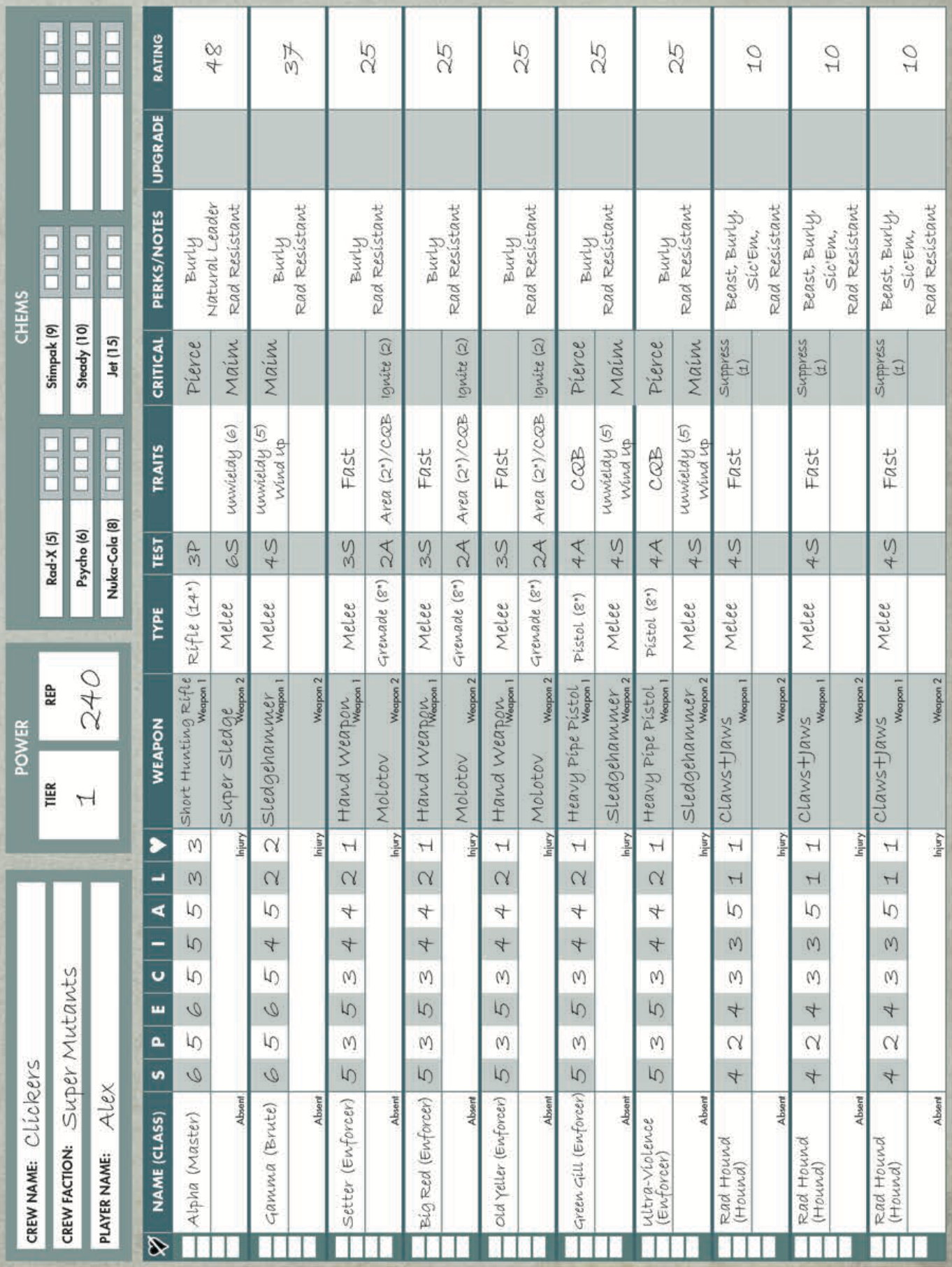
Example Crew: The Clickers
Here you can see a completed Crew Roster for the Clickers, a brand-new Super Mutant crew that's eager to seize some territory and make a name for itself. [Rulebook pg. 33]
Alex has chosen a fairly well-rounded selection of models, focusing on Molotovs and melee fighters. The total Rating value of all the models gave a Reputation of 240, meaning 10 Caps went into their Stash. [Rulebook pg. 33]