Movement
Quick Reference
- Positioning: Base must be fully within the Battlefield; less than half the Base may overhang a Terrain Feature edge.
- Engagement: Two models from different crews are Engaged when their Bases touch.
- Proximity: Each Unengaged model has a 1" Proximity zone. Enemy models cannot enter it unless moving into Engagement.
- Proximity height limit: Proximity does not extend more than 2" above a model's Base.
- Elevation for Engagement: Models more than 2" apart in elevation cannot be Engaged.
- Moving: Pick one point on the Base; reposition so that same point is within the maximum distance allowed.
- Gaps: A model can only cross a gap narrower than its Base.
- Climbing up: Requires a Terrain Feature to climb; vertical distance counts toward movement.
- Dropping down: No Terrain Feature required, but if the elevation drop exceeds the model's Agility (in inches), the move ends immediately on landing.
- Elevation ignored for distance: Except when climbing — all other measurements are taken horizontally.
- Small obstacles/slopes: Differences in elevation under 1", obstacles under 1" tall, and slopes/staircases do not count toward movement distance.
Positioning Models
During play, models are positioned across the Battlefield, either at ground level or on top of Terrain Features. Models must always be positioned so that they are standing up, with their Base entirely within the bounds of the Battlefield. They cannot be placed so that their Base rests on top of another model's Base. [Rulebook pg. 18]
A model's Base must always be as level as possible with the playing surface — ideally it should sit flat, but this is not always possible with detailed Terrain Features. A model can be positioned so that part of its Base hangs over the edge of the Terrain Feature on which it is standing, as long as less than half of the Base overhangs. [Rulebook pg. 18]
Designer's Note: Unstable Models
With a Battlefield full of evocative Terrain, you might want to position one of your models in a tricky place. Maybe it won't sit flat, maybe the Base doesn't quite fit into a gap that's otherwise big enough for the model. The rules can't legislate for every single situation because every Terrain collection is different.
If a model won't fit where you're trying to place it, or it keeps falling over, the most sensible thing is to put it somewhere else. If you really want it to be there, and your opponent agrees that the model should be able to occupy that space, place the model as close as possible but count it as being in the chosen spot. You'll need to make a judgment call when it comes to Visibility (pg. 20). [Rulebook pg. 18]
Engagement and Proximity
If two models from different crews are positioned so that their Bases touch, they are Engaged with each other. This has a number of effects, such as determining the Actions that are available to them. (See Back Off and Brawl.) [Rulebook pg. 18]
Each Unengaged model is surrounded by an area that extends 1" out from its Base. This is the model's Proximity. A model can only enter an Enemy model's Proximity if it is moving into Engagement with that model (see Moving Models, below). [Rulebook pg. 18]
Once a model is Engaged, it loses its Proximity and Enemy models can move past it freely. Note that models are unaffected by the Proximity of Friendly models. [Rulebook pg. 18]
Oddball Cases
A model's Proximity does not extend through solid walls that are at least as tall as the model. This means it can be possible for two models to be within 1" of each other without being Engaged, if there is a solid wall between them. [Rulebook pg. 18]
Example: Measurement
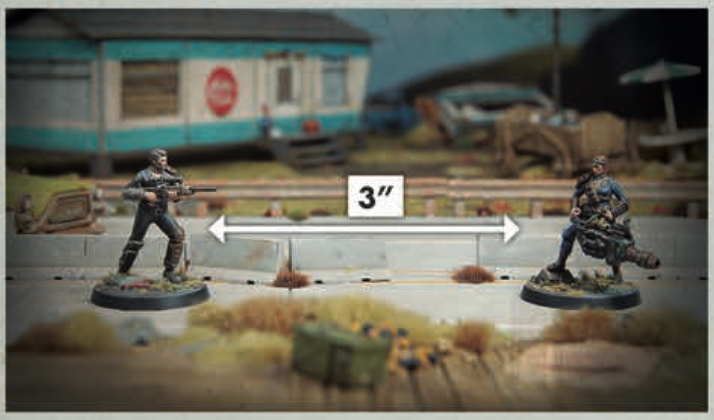
Here, the distance between the Scum and the Local Leader is 3". This measurement is taken between the closest edges of the models' Bases, ignoring any protruding weapons.
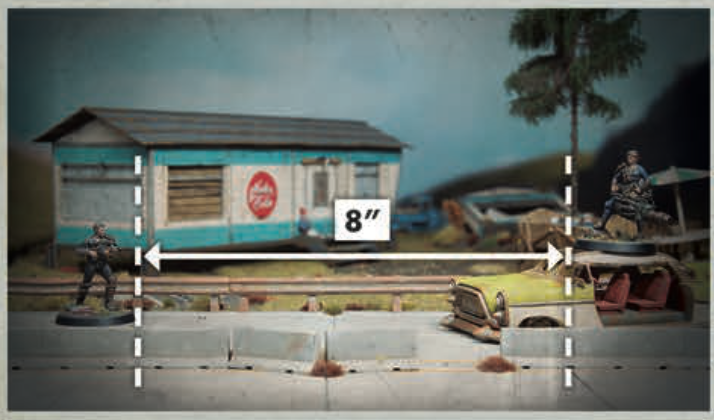
In this example, the models are 8" apart. They're at different heights, but this doesn't mean you measure diagonally.
A model's Proximity does not extend more than 2" above its Base, meaning that models with a greater than 2" difference in elevation cannot be Engaged with each other (see Elevation and Climbing, below). [Rulebook pg. 19]
Errata
Models whose Bases are at different heights can still be Engaged, as long as the elevated model's Base is no higher than the uppermost point of the lower model (ignoring any protruding elements). [Errata Q2 2026]
Designer's Note: Area Denial
The Proximity rules let you block access to areas of the Battlefield. You can place a model at the mouth of a narrow alleyway, knowing that Enemies can't sneak past unless one of them Engages your model. You can also use these rules to protect your Champions — a couple of Grunts can run interference, meaning your opponent will have to pin them down before they can charge into your Leader! [Rulebook pg. 19]
Moving Models
Various rules let players move their models around the Battlefield. [Rulebook pg. 19]
These rules always give the maximum distance (in inches) that the model can move; you do not have to move a model the full distance. To move a model, choose a point on its Base, then reposition the model on the Battlefield so that the chosen point is within this distance. A model is assumed to move in a straight line between its start and end points. Remember that a model must be placed so that its Base is as flat as possible (see Positioning Models, above). [Rulebook pg. 19]
A model can move freely through Friendly models but cannot enter an Enemy's Proximity (see Engagement and Proximity, above) unless it ends its move Engaged with that model. [Rulebook pg. 19]
Players can break a model's move down into multiple smaller moves, as long as the total distance traveled does not exceed the maximum distance allowed. [Rulebook pg. 19]
FAQ
Q: Can a model finish a move within the base of another model?
A: No. [Errata Q2 2026]
Q: Can a model move through the base of an Enemy model?
A: A model may never move through an Enemy model's base, even if they have no Proximity. [Errata Q2 2026]
Q: Some rules require a model to move directly towards or away from another model, Search Token, or point. How does moving directly differ from other forms of moving?
A: The model must move in a straight line, taking the line from the middle of the other model, Search Token, or point. Actual distance measured is still taken from the edge of bases or tokens as normal. [Errata Q2 2026]
Example: Moving Models
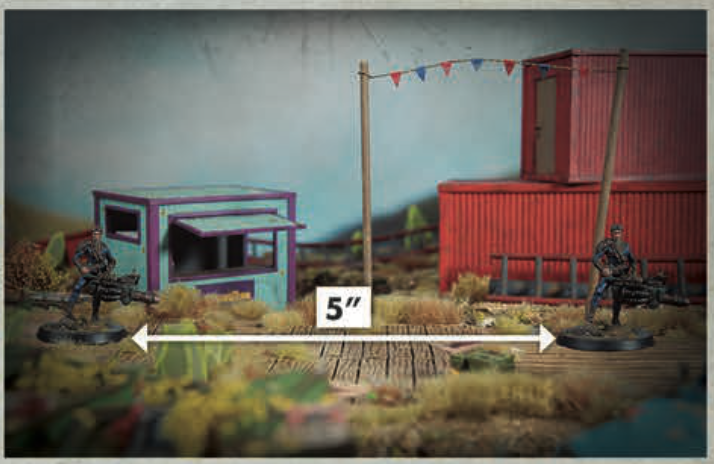
Here, the Survivors player wants to move their Local Leader forward 5". They pick a point on the Base — the front — then pick it up and move the model so that the same point is 5" away. This ensures that the model moves 5" — no more, no less.
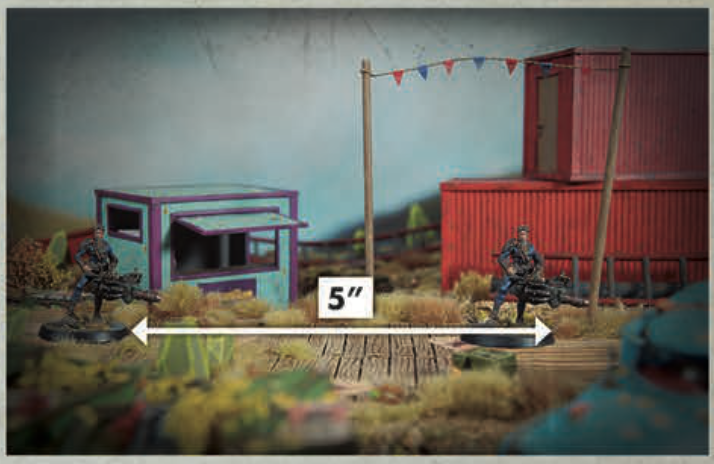
Here, the player isn't being consistent. They start measuring from the front of the Local Leader's Base, then move the model so that the back of its Base is 5" away — which means the Local Leader has moved too far!
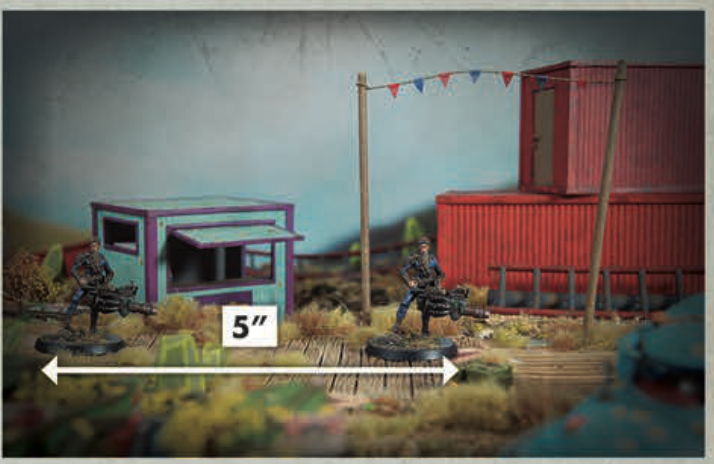
The other way around is also incorrect. This player started measuring from the back of the Local Leader's Base, then moved it so that the front of its Base is 4" away. They've short-changed themselves and, as a result, the Local Leader has only moved a couple of inches.
Crossing Gaps
During a move, a model can cross any Gap that is narrower than its Base. If a gap is any wider, the model cannot move across it. [Rulebook pg. 19]
Elevation and Climbing
The difference in Elevation between models is measured by comparing the height difference between their Bases (or the surface the model is standing on). Models with greater than 2" difference in elevation cannot be Engaged with each other. [Rulebook pg. 19]
Elevation is ignored for all distance measurements except climbing. [Rulebook pg. 19]
A model can Climb up or down a Terrain Feature to reach a higher or lower level. When it does so, the difference in elevation is counted towards its movement distance. [Rulebook pg. 19]
A model can only climb up to a higher level if there is a Terrain Feature to climb (for example, a wall, a rope ladder, or the side of a vehicle). It can drop down without a Terrain Feature (for example, by leaping over the side of a raised walkway), but if the difference in elevation is greater than the model's Agility statistic in inches, the move ends as soon as it reaches the lower level. [Rulebook pg. 20]
FAQ
Q: Can a model drop down from a Terrain Feature in a way where it would move further than it could normally?
A: Yes. [Errata Q2 2026]
Examples: Climbing
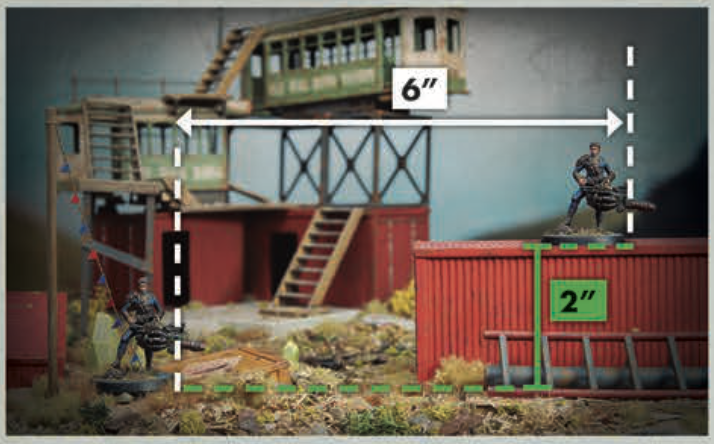
The Survivors player wants to move their Local Leader up onto this Terrain Feature. The total horizontal distance moved is 6" but it includes a change in elevation of 2". This is counted towards the movement distance, so the Local Leader has moved 8".
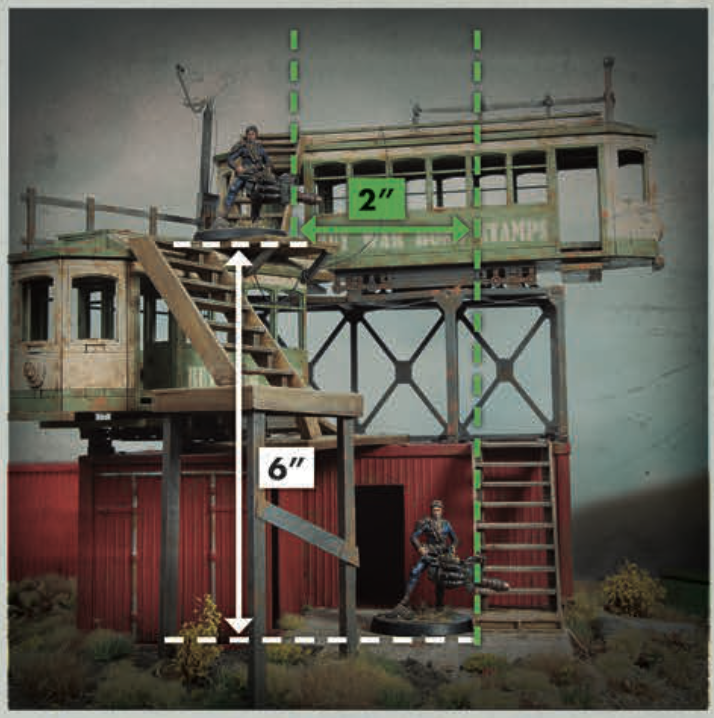
Later, the Survivors player wants their Local Leader to move down from this (much taller!) Terrain Feature. The total horizontal movement distance is 2" but the elevation change is 6", meaning the total movement distance is 8".
However, the Local Leader only has an Agility of 5 and the overhang means there's nothing for them to climb down — they'll have to drop down instead. The change in elevation is greater than their Agility, so their move will end here even if the player would normally be allowed to move the model a greater distance.
Edge Cases
Differences in elevation of less than an inch are not counted towards a model's movement distance. Neither are small obstacles of up to an inch tall. Similarly, when a model climbs a slope or staircase, the elevation change is disregarded. Vertical Distance should only be counted when a model moves in such a way that they would feasibly have to shoulder their weapons and put their hands to use. [Rulebook pg. 20]
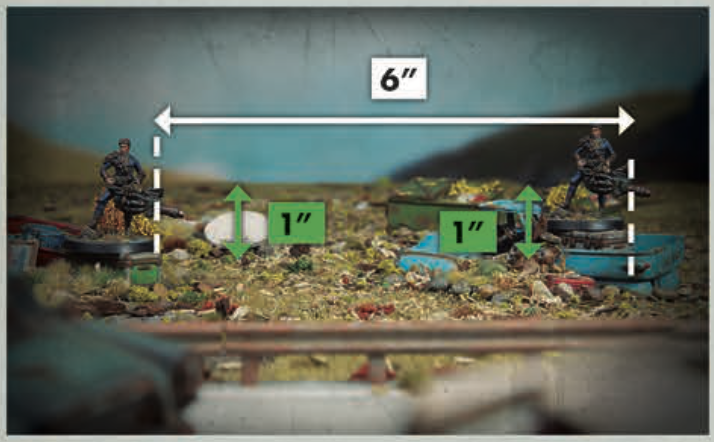
In this example, the Local Leader moves across an obstacle, then clambers up to a slightly higher level. As both elevation changes are under an inch, no vertical movement is counted and the Local Leader is considered to have moved only the horizontal distance of 6".